Faddom Pricing: What It Actually Costs in 2026

Faddom prices in three bands: a free Community Plan under 50 servers, a commitment-tier plan from 50 to 100 servers, and custom enterprise quotes above that — and none of the exact numbers appear on Faddom’s website. Instead of a rate card, you get a configurator that asks about your server count and use case, then routes you to a sales call. That works fine once you already know Faddom is the right tool, but it is frustrating if you are still trying to figure out a realistic budget before that call happens. This guide breaks down what actually drives Faddom cost, what you get for it, and how that compares to Virima at a similar price point.
Why Faddom pricing is hard to pin down
Go to Faddom’s pricing page and you’ll find no dollar figures, only a short intake flow asking how many servers you run, what infrastructure type you have, and what problem you’re solving. That funnels you toward a recommended plan, usually “Pro” for mid-size environments, and from there into a demo request or quote form.
That is a deliberate sales model, not an oversight, and it is common across this category. Faddom’s own pricing variables include:
- Server or instance count
- Modules selected
- User seats
- Support tier
- Compass AI add-on usage (Faddom’s paid AI-powered dependency analysis feature)
Each lever moves the final number, so two companies with the same server count can land on very different quotes.
A 2025 TrustRadius survey of over 2,000 B2B tech buyers found that 62% wished vendors published transparent pricing (source), and roughly half named the lack of published pricing as the one thing they would most want changed about the buying process. Faddom is far from alone in withholding rates, but that does not make the research phase any easier for the IT teams stuck doing it. Top 5 Application Dependency Mapping Tools for IT Teams in 2026
What actually drives Faddom cost
Faddom’s pricing structure breaks into three rough bands based on server count, and each one changes what you can actually do with the product.
Under 50 servers: the Community Plan
Faddom’s Community Plan costs $0 for environments under 50 servers, with no credit card required and a 14-day trial of premium features layered on top. It is a real, usable entry point for small environments, but it is scoped for exactly that: small environments. Anyone managing more than a handful of business applications will outgrow it quickly.
50 to 100 servers: the commitment tier
Once you cross 50 servers, Faddom requires a multi-year commitment to unlock the full feature set — a detail publicly discussed by users on G2 and Reddit, but missing from most pricing conversations. At this tier, a mid-size IT team pays more and locks into a multi-year term before proving the tool out at scale.
100+ servers: enterprise, priced by call
Past 100 servers, Faddom moves into its enterprise plan, and pricing is quote-only. As publicly discussed in buyer reviews on G2 and PeerSpot, entry-level enterprise pricing has been cited anywhere from roughly $10,000 to $20,000 a year. The wide range itself is a signal of how much server count, module selection, and seat count can swing the final invoice. Compass AI, additional seats, and premium support are all sold as add-ons on top of that base.
If you are budgeting for Faddom, plan around a range rather than a single number. Server count sets the floor. Modules, seats, support tier, and AI feature usage all move the ceiling, and Faddom will not confirm where you land until a sales conversation happens.

What you get, and do not get, at that price
Faddom’s core strength is what it was built for: agentless, passive discovery that maps application dependencies across on-prem and cloud environments without installing agents or storing credentials. It builds an initial map quickly and supports use cases like migration planning, cost optimization, and surfacing external traffic and vulnerabilities. For teams that only need a visual map of what talks to what, that is a fast path to value.
Here is the part that matters for pricing comparisons: Faddom is read-only and visibility-focused by design. It does not include a native CMDB, it does not sync bidirectionally with ITSM platforms, and it lacks a native policy or governance layer sitting on top of the map. Faddom’s own configurator sorts you into use cases like “CMDB coverage,” but that is dependency data feeding a map, not a system of record you can govern change and incident workflows against.
How Virima simplifies agentless asset discovery
Faddom vs. Virima pricing: comparable range, different scope
When you compare Faddom vs. Virima pricing at a similar entry price, the two products are not solving the same problem. Faddom maps dependencies. Virima combines agentless and agent-based discovery, a native CMDB, ViVID service maps, and bidirectional integration with the ITSM platforms IT teams already run, including Jira Service Management, Ivanti, Cherwell, Halo, Xurrent, Hornbill, TeamDynamix, and ServiceNow.
| Faddom | Virima | |
|---|---|---|
| Discovery method | Agentless, passive, network-traffic based | Agentless, agent-based, and API-based |
| Native CMDB | No | Yes, with relationship maintenance |
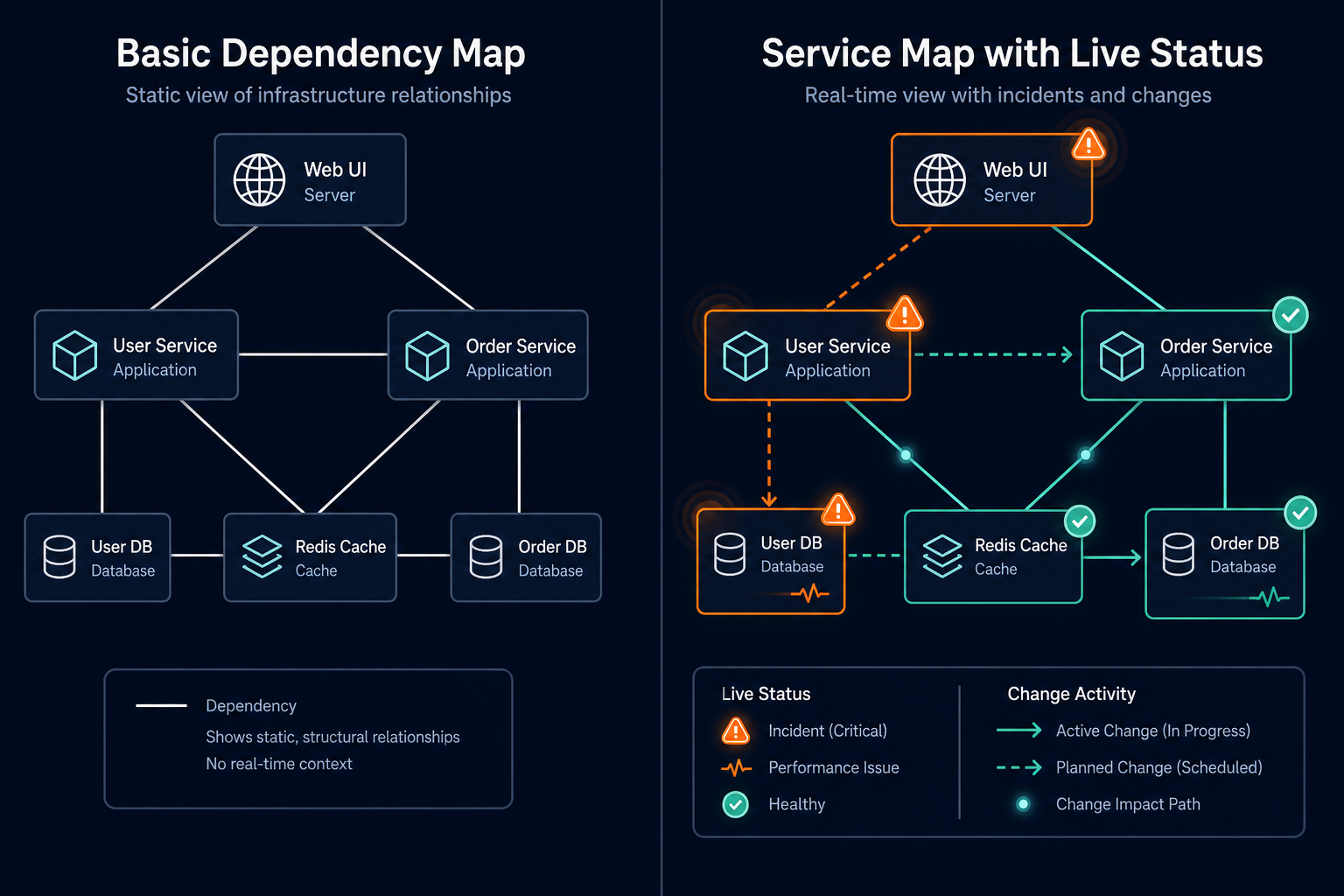
| Service dependency maps | Yes, application-to-infrastructure only | Yes, with ViVID overlays of live incidents, changes, and alerts |
| ITSM integration | Not core to the product | Native, bidirectional, multiple platforms |
| AI feature | Paid add-on (Compass AI) | Built into the core platform |
| Pricing model | Custom quote, server-count driven | Custom quote, scoped to discovery and CMDB needs |
Virima’s ViVID service maps go a step further than a static dependency diagram, layering live incident, change, and alert status onto the same map so an IT team can see blast radius and root cause context in one view.
That gap matters most once budget gets tight: choosing Faddom on price alone can mean buying or building CMDB and ITSM sync capability separately later. That second purchase erodes the up-front savings Faddom looked like it offered.
Virima blog – what a CMDB adds beyond a dependency map covers why that gap matters in practice, and the full Faddom vs. Virima comparison breaks down features side by side.
Is Faddom the right tool for your environment?
Faddom makes sense if dependency mapping is the entire job. Migration planning, a one-time inventory of what talks to what before a cloud move, or a lightweight security visibility layer are all reasonable fits, especially under 50 servers where the Community Plan covers real ground for free.
It gets harder to justify once you need that dependency data to drive operations:
- Change approvals that check blast radius first
- Incidents that resolve faster because the on-call engineer already knows what depends on what
- Audits that need a CMDB rather than a network diagram
At that point, you are pricing Faddom against tools built to do all three, not only the mapping piece.
IT Ops Managers and Directors evaluating agentless discovery and CMDB tools should ask what happens after the map is built, not only how the map gets built. A dependency map that cannot feed a governed CMDB or sync with the ticketing system a team already runs will need a second tool eventually, and that second tool has its own price tag.
Virima delivers trusted runtime truth across your entire IT estate — discovery, CMDB, and service maps in one platform instead of stitched together from two vendors.